Sunday, August 30, 2015

Developp Bash script without worrying


I have often used bash to write shell script. In most cases, you have to hurry up and you don't go further into ... Here is two tips that could help you.

Developp without worrying


To developp bash script, it's better to use the following :


#!/bin/bash
set -euo pipefail
IFS=$'\n\t'

With theses paramters, you will be able to detect silent errors, un intialize variables and so on...
See that good link for more details : http://redsymbol.net/articles/unofficial-bash-strict-mode/


Help in syntax


Here is a cool link to help you in shell syntax : http://www.shellcheck.net/

Saturday, August 30, 2014

app-textrarian compilation failed


Last week, I had problem with app-textrarian compilation.
So I ask about this on funtoo forum and a work around was given to me.
If you change the LINGUAS to EN, it compiles.Thanks to Oleg Vinichenko.

My posts :
http://forums.funtoo.org/index.php?/topic/161-app-textrarian-081-r2-failed/
https://bugs.funtoo.org/browse/FL-1497

Thursday, August 28, 2014

emerge: there are no ebuilds to satisfy


I had the following message when I executed emerge -p world :

emerge: there are no ebuilds to satisfy "sys-kernel/gentoo-sources:3.10.32". (dependency required by "@selected" [set]) (dependency required by "@world" [argument]) 
emerge: there are no ebuilds to satisfy "sys-kernel/gentoo-sources:3.12.13". (dependency required by "@selected" [set]) (dependency required by "@world" [argument])


The solution is to remove ebuild from world file :

emerge --deselect sys-kernel/gentoo-sources:3.10.32


Thanks to mackal for the solution
See the post message on Gentoo forum : https://forums.gentoo.org/viewtopic-t-998826-highlight-.html

Friday, August 22, 2014

dev-lang/perl conflict

I started to look at Funto project ( an other version of Gentoo) and I met a problem during update :


WARNING: One or more updates have been skipped due to a dependency conflict:

dev-lang/perl:0

  (dev-lang/perl-5.18.2-r1::gentoo, ebuild scheduled for merge) conflicts with
    =dev-lang/perl-5.16* required by (virtual/perl-Perl-OSType-1.2.0-r1::gentoo, installed)


To solve this problem, I ran the following commands :

emerge -1auD $(qlist -IC 'virtual/perl-*')
perl-cleaner --all


See also forum Gentoo


Note :

When I executed emerge command, it appears a problem with the following package : app-text/rarian. I will look at this problem later.

 * Messages for package app-text/rarian-0.8.1-r2:

 * ERROR: app-text/rarian-0.8.1-r2 failed (compile phase):
 *   emake failed
 *
 * If you need support, post the output of `emerge --info '=app-text/rarian-0.8.1-r2'`,
 * the complete build log and the output of `emerge -pqv '=app-text/rarian-0.8.1-r2'`.
 * The complete build log is located at '/var/tmp/portage/app-text/rarian-0.8.1-r2/temp/build.log'.
 * The ebuild environment file is located at '/var/tmp/portage/app-text/rarian-0.8.1-r2/temp/environment'.
 * Working directory: '/var/tmp/portage/app-text/rarian-0.8.1-r2/work/rarian-0.8.1'
 * S: '/var/tmp/portage/app-text/rarian-0.8.1-r2/work/rarian-0.8.1'

 * Regenerating GNU info directory index...
 * Processed 109 info files.

Wednesday, August 20, 2014

Difficult back from holiday with systemd

Back from holiday, I decided to update my Gento and I had som problems during update
with systemd.
I found the solution on Gentoo forum :

sys-apps/systemd contains udev and, then, you can safely let sys-fs/udev be removed as systemd will be the provider for virtual/udev.
sys-apps/systemd and sys-apps/dbus have a circular dependency which necessitates a 2-stage installation.
Install sys-apps/dbus with USE="-systemd". This is probably already done if you have a working desktop environment.
Enable the systemd USE flag globally (make.conf) and install sys-apps/systemd. This may also be accomplished by a world update. The consolekit use flag should also be disabled to prevent conflicts with the systemd-logind service. You can also switch to a systemd subprofile to use saner USE flags defaults not needing to change make.conf:

Thanks to eyoung100  : http://forums.gentoo.org/viewtopic-t-977642-start-0.html

Sunday, May 25, 2014

PrintScreen on KDE

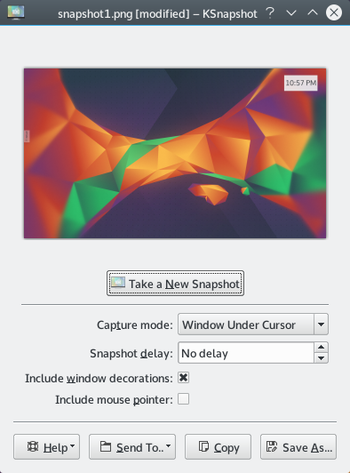
If like me, you installed KDE by hand and you don't have screen capture, it is certainly that you don't have the ksnapshot installed.
So you have to run the following command :


emerge ksnapshot


KSnapshotdefaultscreen.png

Some comment about KSnapshot. It has interesting feature like :
  • Snapshot delay for capture drop down menu.
  • You can choose to add or not the mouse cursor.
  • You can send your snapshot to an other software like for example Gimp.
  • ALT Gr + printscreen is a shortcut to take only a window capture.


See also: http://userbase.kde.org/KSnapshot

Friday, May 16, 2014

Shell script debugger online


ShellCheck

ShellCheck is a online tool to debug script shell.
You only have to paste your shell script and clic on a button to see if there is error and help you to find it !
So a great tool to have in this pocket !

More information : http://www.shellcheck.net/

Monday, May 5, 2014

firefox-29 available on Gentoo portage

  
I emerge the last version of firefox with succes ( firefox-29 Australis )
 

emerge --ask --verbose '=www-client/firefox-29*'

If you want a complete description, you could look at https://blog.mozilla.org/ux/2013/12/whywhatiswhere/.

Saturday, March 8, 2014

Konsole 2.11.3 bug under KDE 4.11.5

Konsole 2.11.3 has an annoying bug.Cursor moved forward some pixel from your line.So, you can't use Konsole ( for any person only ).
That's why I decided to test Guake terminal. To now, I find this simple and it works.

If you want to test it : emerge guake

Sunday, February 16, 2014

Kde-4.11.5 today

Today, I update mygentoo and I saw lot of KDE update : the Kde-4.11.5 version.
Apparently, don't worry about this update :
"This release only contains bugfixes and translation updates and will be a safe and pleasant update for everyone."

See also : http://www.kde.org/announcements/announce-4.11.5.php

Sunday, January 12, 2014

nvidia driver 314.X for Geforce 9800 GT and kernel module

I had some problem with new nvidia-driver (314.X)  and my card Geforce 9800 GT.
So, to avoid problem again, I change the driver.Now, I use the open source driver for nvidia : nouveau
It works and it's easy to configure : http://wiki.gentoo.org/wiki/Nouveau

Sunday, January 5, 2014

kde console and azerty

If you launch your KDE and the console mode is QWERTY, you can easily change it with interface System Configuration of KDE.
Click on Input Devices.Then choose keyboard and go on the Layouts tabs.
Click on the configure layouts checkbox.
Then you have to click Apply.
If you restart your KDE console, the mode should be change.


Note : I used KDE 4.11.2.


Tuesday, December 31, 2013

eth0 does not exist ( renamed in enp2s0 )

I upgraded my gentoo and I had a problem with internet connection.
The following command told me that eth0 didn't exist :

/etc/init.d/net.eth0 restart

I checked if my network card exists by making :

dmsg -v | less

It exists because I had a line similary to:

02:00:00 Ethernet controller : .....

So, I checked all my network interface  :

ls /sys/class/net 

In the result list, there was no eth0 interface. However, there was enp2s0 interface.
I solved my problem by creating a symbolic link ( you could see this good wiki : https://wiki.archlinux.org/index.php/Dhcpcd#Dynamic_IP_address )

ln -s /dev/null /etc/udev/rules.d/80-net-name-slot.rules

Friday, September 20, 2013

emerge and less

When you use emerge, you want cetainly use less.
But, if you want it work, you have to do the following :

emerge -p system 2>&1 | less

Monday, June 3, 2013

Mysql install on Gentoo

I've tried to install Mysql with emerge but without success. That's why, I install it manually by following the install file in the binary distribution :

  • shell> groupadd mysql
  • shell> useradd -r -g mysql mysql
  • shell> cd /usr/local
  • shell> tar zxvf /path/to/mysql-VERSION-OS.tar.gz
  • shell> ln -s full-path-to-mysql-VERSION-OS mysql
  • shell> cd mysql
  • shell> chown -R mysql .
  • shell> chgrp -R mysql .
  • shell> scripts/mysql_install_db --user=mysql
I have the following error :

Installing MySQL system tables..../bin/mysqld: error while loading shared libraries: libaio.so.1: cannot open shared object file: No such file or directory

To solve this issue , I install libaio with emerge dev-libs/libaio

  • shell> chown -R root .
  • shell> chown -R mysql data
  • shell> cp support-files/my-medium.cnf /etc/my.cnf
  • shell> bin/mysqld_safe --user=mysql &
In the file monfichier.err which is located in  /usr/local/mysql/data/ I have the following error : Can't open and lock privilege tables: Table 'mysql.user' doesn't exist

I solve the problem with mysql_install_db --user=mysql --ldata=/usr/local/mysql/data/


Note :

I have the same error with :
GRANT ALL ON tbl.* TO 'user'@'localhost' IDENTIFIED BY 'tbl';
==> Error Mysql.User doesn't exist

In fact, I have an old version of Mysql on my computer. So, I unstall it and I type the following :

./scripts/mysql_install_db --user=mysql --ldata=/usr/local/mysql/data/
Installing MySQL system tables...2013-06-03 13:28:20 0 [Warning] TIMESTAMP with implicit DEFAULT value is deprecated. Please use --explicit_defaults_for_timestamp server option (see documentation for more details).
2013-06-03 13:28:20 7779 [Note] InnoDB: The InnoDB memory heap is disabled
2013-06-03 13:28:20 7779 [Note] InnoDB: Mutexes and rw_locks use InnoDB's own implementation
2013-06-03 13:28:20 7779 [Note] InnoDB: Compressed tables use zlib 1.2.3
2013-06-03 13:28:20 7779 [Note] InnoDB: Using Linux native AIO
2013-06-03 13:28:20 7779 [Note] InnoDB: Not using CPU crc32 instructions
2013-06-03 13:28:20 7779 [Note] InnoDB: Initializing buffer pool, size = 128.0M
2013-06-03 13:28:20 7779 [Note] InnoDB: Completed initialization of buffer pool
2013-06-03 13:28:20 7779 [Note] InnoDB: Highest supported file format is Barracuda.
2013-06-03 13:28:20 7779 [Note] InnoDB: The log sequence numbers 1600614 and 1600614 in ibdata files do not match the log sequence number 1601046 in the ib_logfiles!
2013-06-03 13:28:20 7779 [Note] InnoDB: Database was not shutdown normally!
2013-06-03 13:28:20 7779 [Note] InnoDB: Starting crash recovery.
2013-06-03 13:28:20 7779 [Note] InnoDB: Reading tablespace information from the .ibd files...
2013-06-03 13:28:20 7779 [Note] InnoDB: Restoring possible half-written data pages
2013-06-03 13:28:20 7779 [Note] InnoDB: from the doublewrite buffer...
2013-06-03 13:28:20 7779 [Note] InnoDB: 128 rollback segment(s) are active.
2013-06-03 13:28:20 7779 [Note] InnoDB: Waiting for purge to start
2013-06-03 13:28:20 7779 [Note] InnoDB: 5.6.11 started; log sequence number 1601046
2013-06-03 13:28:24 7779 [Note] Binlog end
2013-06-03 13:28:24 7779 [Note] InnoDB: FTS optimize thread exiting.
2013-06-03 13:28:24 7779 [Note] InnoDB: Starting shutdown...
2013-06-03 13:28:25 7779 [Note] InnoDB: Shutdown completed; log sequence number 1626426
OK

Filling help tables...2013-06-03 13:28:25 0 [Warning] TIMESTAMP with implicit DEFAULT value is deprecated. Please use --explicit_defaults_for_timestamp server option (see documentation for more details).
2013-06-03 13:28:25 7804 [Note] InnoDB: The InnoDB memory heap is disabled
2013-06-03 13:28:25 7804 [Note] InnoDB: Mutexes and rw_locks use InnoDB's own implementation
2013-06-03 13:28:25 7804 [Note] InnoDB: Compressed tables use zlib 1.2.3
2013-06-03 13:28:25 7804 [Note] InnoDB: Using Linux native AIO
2013-06-03 13:28:25 7804 [Note] InnoDB: Not using CPU crc32 instructions
2013-06-03 13:28:25 7804 [Note] InnoDB: Initializing buffer pool, size = 128.0M
2013-06-03 13:28:25 7804 [Note] InnoDB: Completed initialization of buffer pool
2013-06-03 13:28:25 7804 [Note] InnoDB: Highest supported file format is Barracuda.
2013-06-03 13:28:25 7804 [Note] InnoDB: 128 rollback segment(s) are active.
2013-06-03 13:28:25 7804 [Note] InnoDB: Waiting for purge to start
2013-06-03 13:28:25 7804 [Note] InnoDB: 5.6.11 started; log sequence number 1626426
2013-06-03 13:28:25 7804 [Note] Binlog end
2013-06-03 13:28:25 7804 [Note] InnoDB: FTS optimize thread exiting.
2013-06-03 13:28:25 7804 [Note] InnoDB: Starting shutdown...
2013-06-03 13:28:27 7804 [Note] InnoDB: Shutdown completed; log sequence number 1626436
OK


...
Finished !

Friday, April 19, 2013

CONFIG_DEVTMPFS: is not set when it should be


Problem

emerge  sys-fs/udev

* Messages for package sys-fs/udev-200:

 *   CONFIG_DEVTMPFS:    is not set when it should be.
 * Please check to make sure these options are set correctly.
 * Failure to do so may cause unexpected problems.


Solution

 You have to check the following  option in your kernel config :

 Device Drivers-> Generic Driver 
* Maintain a devtmpfs filesystem to mount at /dev.  

 For getting the devfs automatically mounted at boot time it makes sense to also enable the option  
* Automount devtmpfs at /dev


Thursday, April 18, 2013

Chromium 26.0.1410.43 Failed

Problème


I tried to build this Chromium version : 26.0.1410.43 but whithout success.


Solution


The only solution I found it's to downgrade package :


 vi /etc/portage/package.mask.
 >www-client/chromium-23.0.1271.97


Merci à http://mindspill.net/computing/linux-notes/gentoo/how-to-downgrade-a-gentoo-package/

Sunday, April 14, 2013

CONFIG_DM_CRYPT: is not set (required for cryptsetup)

Problem

* Messages for package sys-fs/cryptsetup-1.4.3:

*   CONFIG_DM_CRYPT:   is not set (required for cryptsetup)
*
* Please check to make sure these options are set correctly.
* Failure to do so may cause unexpected problems.
* This ebuild introduces a new set of scripts and configuration
* than the last version. If you are currently using /etc/conf.d/cryptfs
* then you *MUST* copy your old file to:
* /etc/conf.d/dmcrypt
* Or your encrypted partitions will *NOT* work.
* Please see the example for configuring a LUKS mountpoint
* in /etc/conf.d/dmcrypt
*
* If you are using baselayout-2 then please do:
* rc-update add dmcrypt boot
* This version introduces a command line arguement 'key_timeout'.
* If you want the search for the removable key device to timeout
* after 10 seconds add the following to your bootloader config:
* key_timeout=10
* A timeout of 0 will mean it will wait indefinitely.
*
* Users using cryptsetup-1.0.x (dm-crypt plain) volumes must use
* a compatibility mode when using cryptsetup-1.1.x. This can be
* done by specifying the cipher (-c), key size (-s) and hash (-h).
* For more info, see http://code.google.com/p/cryptsetup/wiki/FrequentlyAskedQuestions#6._Issues_with_Specific_Versions_of_cryptsetup


Solution

- Update kernel
- Check device drivers -> Multiple devices driver support (RAID and LVM) -> Crypt target support 
- emerge sys-fs/cryptsetup

See foolowing links :

Saturday, March 9, 2013

sys-apps/sysvinit-2.88-r4" is blocking sys-apps/util-linux-2.22.2


Problème :

emerge -p system
[blocks B      ] <sys-apps/sysvinit-2.88-r4 ("<sys-apps/sysvinit-2.88-r4" is blocking sys-apps/util-linux-2.22.2)


Solution :

It means that older version of sys-apps/sysvinit is blocking sys-apps/util-linux.
So you have to upgrade sys-apps/sysvinit before sys-apps/util-linux.
Or you can make the following :

emerge -uDv1 sysvinit util-linux


See http://forums.gentoo.org/viewtopic-t-952770-start-0-postdays-0-postorder-asc-highlight-.html?sid=39638f320d5e82ad9f36be3479918c87