I started to look at Funto project ( an other version of Gentoo) and I met a problem during update :
WARNING: One or more updates have been skipped due to a dependency conflict:
dev-lang/perl:0
(dev-lang/perl-5.18.2-r1::gentoo, ebuild scheduled for merge) conflicts with
=dev-lang/perl-5.16* required by (virtual/perl-Perl-OSType-1.2.0-r1::gentoo, installed)
To solve this problem, I ran the following commands :
emerge -1auD $(qlist -IC 'virtual/perl-*')
perl-cleaner --all
See also forum Gentoo
Note :
When I executed emerge command, it appears a problem with the following package : app-text/rarian. I will look at this problem later.
* Messages for package app-text/rarian-0.8.1-r2:
* ERROR: app-text/rarian-0.8.1-r2 failed (compile phase):
* emake failed
*
* If you need support, post the output of `emerge --info '=app-text/rarian-0.8.1-r2'`,
* the complete build log and the output of `emerge -pqv '=app-text/rarian-0.8.1-r2'`.
* The complete build log is located at '/var/tmp/portage/app-text/rarian-0.8.1-r2/temp/build.log'.
* The ebuild environment file is located at '/var/tmp/portage/app-text/rarian-0.8.1-r2/temp/environment'.
* Working directory: '/var/tmp/portage/app-text/rarian-0.8.1-r2/work/rarian-0.8.1'
* S: '/var/tmp/portage/app-text/rarian-0.8.1-r2/work/rarian-0.8.1'
* Regenerating GNU info directory index...
* Processed 109 info files.
Friday, August 22, 2014


Wednesday, August 20, 2014
Difficult back from holiday with systemd
Back from holiday, I decided to update my Gento and I had som problems during update
with systemd.
I found the solution on Gentoo forum :
Thanks to eyoung100 : http://forums.gentoo.org/viewtopic-t-977642-start-0.html
with systemd.
I found the solution on Gentoo forum :
sys-apps/systemd contains udev and, then, you can safely let sys-fs/udev be removed as systemd will be the provider for virtual/udev.
sys-apps/systemd and sys-apps/dbus have a circular dependency which necessitates a 2-stage installation.
Install sys-apps/dbus with USE="-systemd". This is probably already done if you have a working desktop environment.
Enable the systemd USE flag globally (make.conf) and install sys-apps/systemd. This may also be accomplished by a world update. The consolekit use flag should also be disabled to prevent conflicts with the systemd-logind service. You can also switch to a systemd subprofile to use saner USE flags defaults not needing to change make.conf:
Thanks to eyoung100 : http://forums.gentoo.org/viewtopic-t-977642-start-0.html
Sunday, May 25, 2014
PrintScreen on KDE
If like me, you installed KDE by hand and you don't have screen capture, it is certainly that you don't have the ksnapshot installed.
So you have to run the following command :
emerge ksnapshot

Some comment about KSnapshot. It has interesting feature like :

See also: http://userbase.kde.org/KSnapshot
So you have to run the following command :
emerge ksnapshot
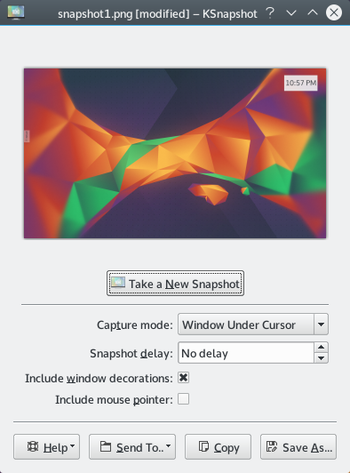
Some comment about KSnapshot. It has interesting feature like :
- Snapshot delay for capture drop down menu.
- You can choose to add or not the mouse cursor.
- You can send your snapshot to an other software like for example Gimp.
- ALT Gr + printscreen is a shortcut to take only a window capture.
See also: http://userbase.kde.org/KSnapshot
Friday, May 16, 2014
Shell script debugger online

ShellCheck is a online tool to debug script shell.
You only have to paste your shell script and clic on a button to see if there is error and help you to find it !
So a great tool to have in this pocket !
More information : http://www.shellcheck.net/
Monday, May 5, 2014
firefox-29 available on Gentoo portage
I emerge the last version of firefox with succes ( firefox-29 Australis )
emerge --ask --verbose '=www-client/firefox-29*'
If you want a complete description, you could look at https://blog.mozilla.org/ux/2013/12/whywhatiswhere/.
Saturday, March 8, 2014
Konsole 2.11.3 bug under KDE 4.11.5
Konsole 2.11.3 has an annoying bug.Cursor moved forward some pixel from your line.So, you can't use Konsole ( for any person only ).
That's why I decided to test Guake terminal. To now, I find this simple and it works.
If you want to test it : emerge guake
That's why I decided to test Guake terminal. To now, I find this simple and it works.
If you want to test it : emerge guake
Sunday, February 16, 2014
Kde-4.11.5 today
Today, I update mygentoo and I saw lot of KDE update : the Kde-4.11.5 version.
Apparently, don't worry about this update :
"This release only contains bugfixes and translation updates and will be a safe and pleasant update for everyone."
See also : http://www.kde.org/announcements/announce-4.11.5.php
Apparently, don't worry about this update :
"This release only contains bugfixes and translation updates and will be a safe and pleasant update for everyone."
See also : http://www.kde.org/announcements/announce-4.11.5.php
Subscribe to:
Posts (Atom)
